

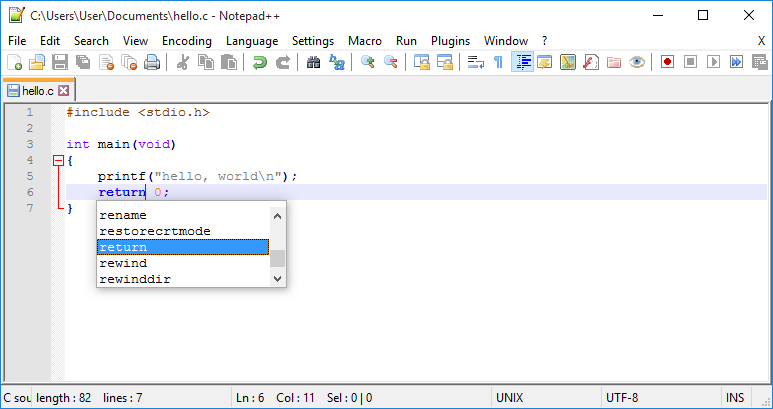
Almost every programming course begins with a program that prints the words Hello World, and beginners sometimes wonder why such a tiny program deserves so much attention. The answer is that this little program is a complete tour of the whole programming process in miniature. It teaches you how to write code in an editor, how to ask the compiler to check and translate it, how to run the finished program, and how to read the output. Once you can do those four things confidently, you can learn any other idea in the language, because every larger program is built from the same cycle. This guide explains each line of the program slowly, shows you how to build it in Turbo C, and points out the mistakes that most beginners make the first time.
What Hello World Teaches You
Hello World is small on purpose. A short program means there are very few places for mistakes to hide, so when something goes wrong, you can find it quickly and learn from it. It also gives you an immediate reward: within minutes of starting, you have made the computer do something visible. That feeling of control is important, because programming is largely about breaking big problems into small steps and testing each step as you go. The greeting program also introduces the basic shape of every C program, including header files, the main function, statements, and punctuation. Learn this shape well, and every program you meet later will look familiar, even when it is much longer.
Writing the Code
Open Turbo C and create a new file, then type the program exactly as shown in your course material or textbook. The first line includes a header file that provides printing functions, and it begins with a hash symbol that marks it as an instruction to the compiler rather than ordinary code. The next part defines the main function, which is the starting point of the program, and its body is enclosed in curly brackets. Inside those brackets, a single printing statement sends the greeting to the screen, and a return statement ends the program cleanly. Pay close attention to every semicolon, bracket, and quotation mark, because the compiler treats punctuation as strictly as it treats words. Typing the program yourself, rather than copying and pasting it, is part of the lesson, since it trains your eyes to notice small details.
Compiling Step by Step
Compiling is the process of translating your human-readable code into a program the computer can run, and Turbo C makes it a single command. When you ask for compilation, the compiler reads your file from top to bottom and checks it against the rules of the C language. If it finds a problem, it stops and shows you an error message with a line number, which is your clue for where to look. Do not be discouraged by errors at this stage, because even experienced programmers see them constantly. Read the message, look at the named line, fix one thing, and compile again. Each cycle teaches you a rule of the language, and after a few cycles the same mistakes will stop appearing. When compilation succeeds with no errors, the compiler produces a runnable program file, and you are ready for the most satisfying step.
Running and Seeing Output
Running the program executes the instructions you wrote, and in this case the only visible result is the greeting printed on the screen. In Turbo C, the output usually appears in a separate output window, and you may need to switch to it to see your message. Take a moment to enjoy that result, because you have just completed the full cycle of software development. Then prove that you understand it by changing the greeting to your own name or a short joke, recompiling, and running it again. Watching the output change in response to your edit is the moment when programming stops being abstract and starts feeling real. Many learners find that this tiny experiment motivates them more than any lecture, and it is worth repeating with different messages until the process feels automatic.
Changing the Program
Once the basic program works, try small variations that each teach one new idea. Print two lines instead of one by adding a second printing statement, and notice how the statements run in order from top to bottom. Add a blank line between greetings, or print a simple pattern of stars, and observe how the output follows your instructions exactly. Then try printing a number, which requires a slightly different format in the printing statement, and see how the computer handles numbers differently from words. Each variation is a safe experiment, because the worst outcome is an error message that tells you what to fix. Learners who enjoy exploring at this stage often pick up the language faster than those who only read about it, so give yourself permission to play.
Common Beginner Mistakes
Almost every beginner meets the same handful of mistakes, and knowing them in advance will save you frustration. The most common is a missing semicolon at the end of a statement, which usually produces an error on the following line rather than the line where the semicolon belongs. Next come mismatched brackets and quotation marks, which confuse the compiler about where a statement or a piece of text ends. Capitalization matters too, because the language treats uppercase and lowercase letters as different, so a function name typed with the wrong case will not be recognized. Finally, remember to save your file before compiling, because compiling an unsaved file tests the old version, not the one on your screen. If you ever feel stuck, a plain-language overview such as turbo c can help you reset and see the process clearly again. Keep practicing, keep your programs small, and soon you will be ready for variables, input, and decisions. For further background on the environment itself, turboc.org offers a helpful starting point, and your next program is only a few lines away.
